Who has completed the mandatory training?
oneLearning
- Upload own materials
- Videos, PDFs, tests
- See who is where
- Course creation with exams
One system that keeps up with how you work: onboarding, training, documents, time, performance — and one management view of what happens inside them.
The same system, in the cloud or on your own servers — still small today, multiple sites tomorrow
How deep shall we go?
Same system. Three depths.
Maybe you're the same headcount as five years ago. And yet…
The company didn't change. The operation became more complex.
The operation changes.
The system stays.
Don't look at modules — look at the process. A new hire's data is entered once and flows all the way through.
New hire
Data capture, declarations, checklists in one form.
Documents
Contract generated, signed, provably archived.
Training
Mandatory courses assigned and tracked automatically.
Exam
Exams and practice confirm the knowledge is there.
Competency
Matrices and skills — who may work where.
Performance
An objective performance picture for management decisions.
Management compass
Every measuring point converges on one dashboard.
The same new-hire data — never re-typed anywhere.
Each module takes one recurring question off your plate. They work on their own — together they work from the same data.
Who has completed the mandatory training?
How is everyone performing, and what should they work on?
It was signed — but is there a record of it?
Where has the new hire's onboarding got to?
Who is in today, and how do the hours stand?
What do all these numbers say together?
And everything that fits none of the above?
Messages, to-dos, help, surveys, declarations — small modules in the same system.
Every employee question lands in one queue. Employees ask where they got stuck — in a lesson, before or after an exam, in a leave request — and HR answers in one place.
You see the number of unanswered questions and the average response time; open questions trigger a reminder.
One mailbox for the employee: news, messages, notifications and assigned surveys. It works even without an e-mail address, and completed to-dos grey out by themselves.
Set it once, and it goes to the right people on the right day: everyone, a group or an HR-data condition; now, from a date, yearly or on a personal date (birthday, work anniversary).
To the Inbox and/or by e-mail — and you see who received it and who read it.
One tile shows what is waiting for you: leave to approve, employer signatures, expiring training, surveys due, missing attendance days, probation ending — each person within their own rights.
Message drafts are prepared for the to-dos (reminder, access extension, birthday greeting); HR sends them.
HR NowAsk about the system in your own words: the answer is the lesson and the slide where the solution is — only from what the person asking can see. It also answers about their own data (e.g. how much leave is left).
If switched on, an EU-hosted cloud model (AI) sums up the answer in one to three sentences from the sources found, with source references.
Built-in, searchable help: depending on the modules in use, up to 200+ short lessons (in Hungarian), filtered by role.
Your own questionnaires with six question types, assigned by name with a deadline — or anonymous: by QR code and short link, without login, with a printable poster.
Results per question as charts, free-text answers as a list, exportable to Excel.
Get it accepted, and it stays on record: declarations at login, before a course or training; the system keeps the version and the time of acceptance.
After a passed exam the employee downloads the certificate; on e-learning certificates a QR code proves it is genuine.
oneLearningThe new joiner signs in via a one-time link and hands in everything on one form: personal data, documents, declarations with a hand-drawn signature. On submit the data goes into the HR database.
The system works out when the day-7, day-30 and end-of-probation surveys are due; HR assigns them with one click.
get-2.workSalary ranges in job ads, job categories, pay and benefit data, information requests with a two-month deadline and a gender pay gap report — for the EU Pay Transparency Directive.
A separate module, off by default; every pay view is logged.
Pay transparencyThese are not separate programs. They are parts of one system — working from the same data.
No need to open five modules. HR Now gathers what needs attention right now — from live data.
Every module writes to the same to-do list. That is what makes it one system.
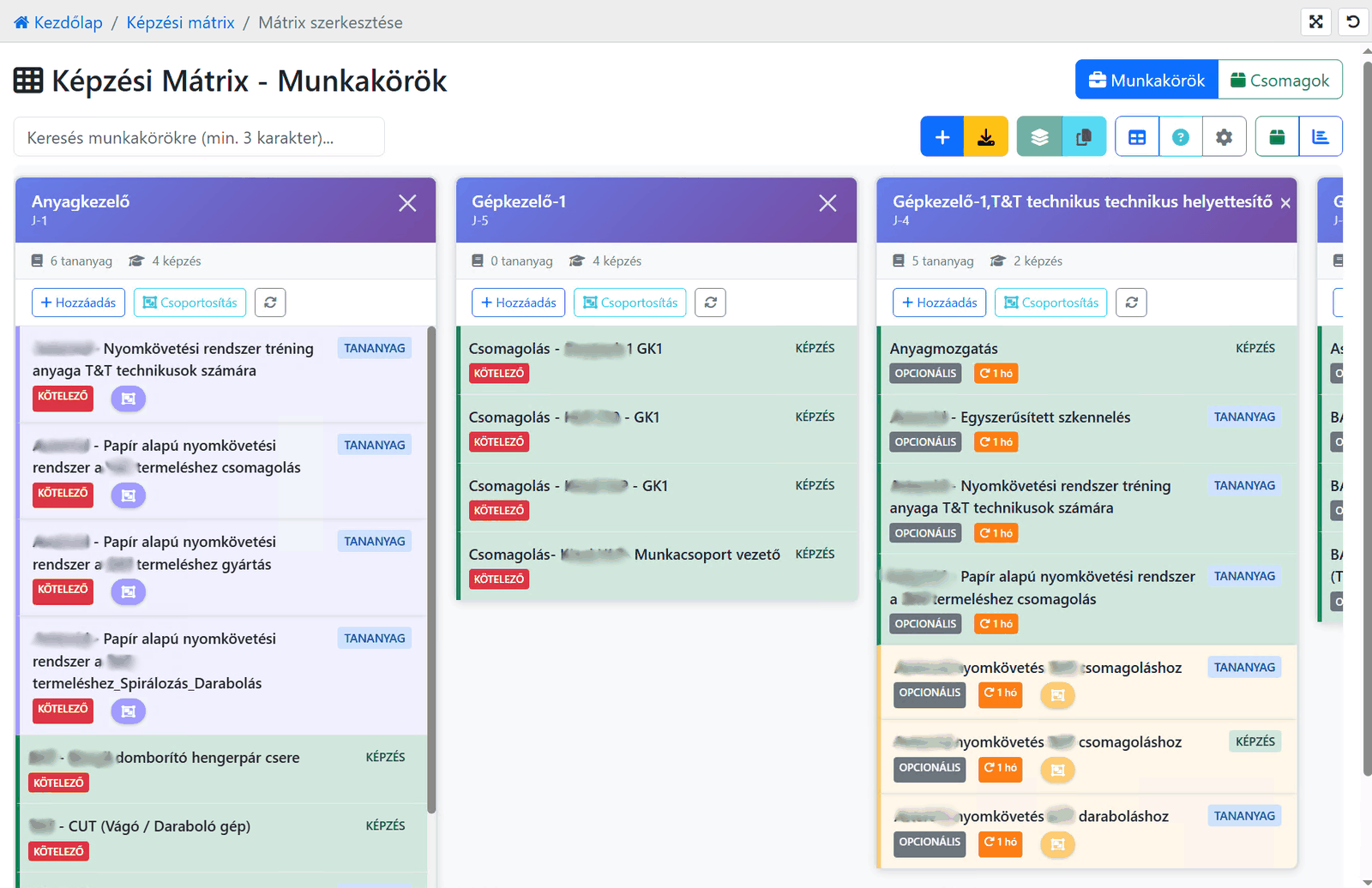
Real system screen · with test data
No report request, no asking around. One look — and they know where to step in.
Red means mandatory — per role.
Per site: what expires soon.
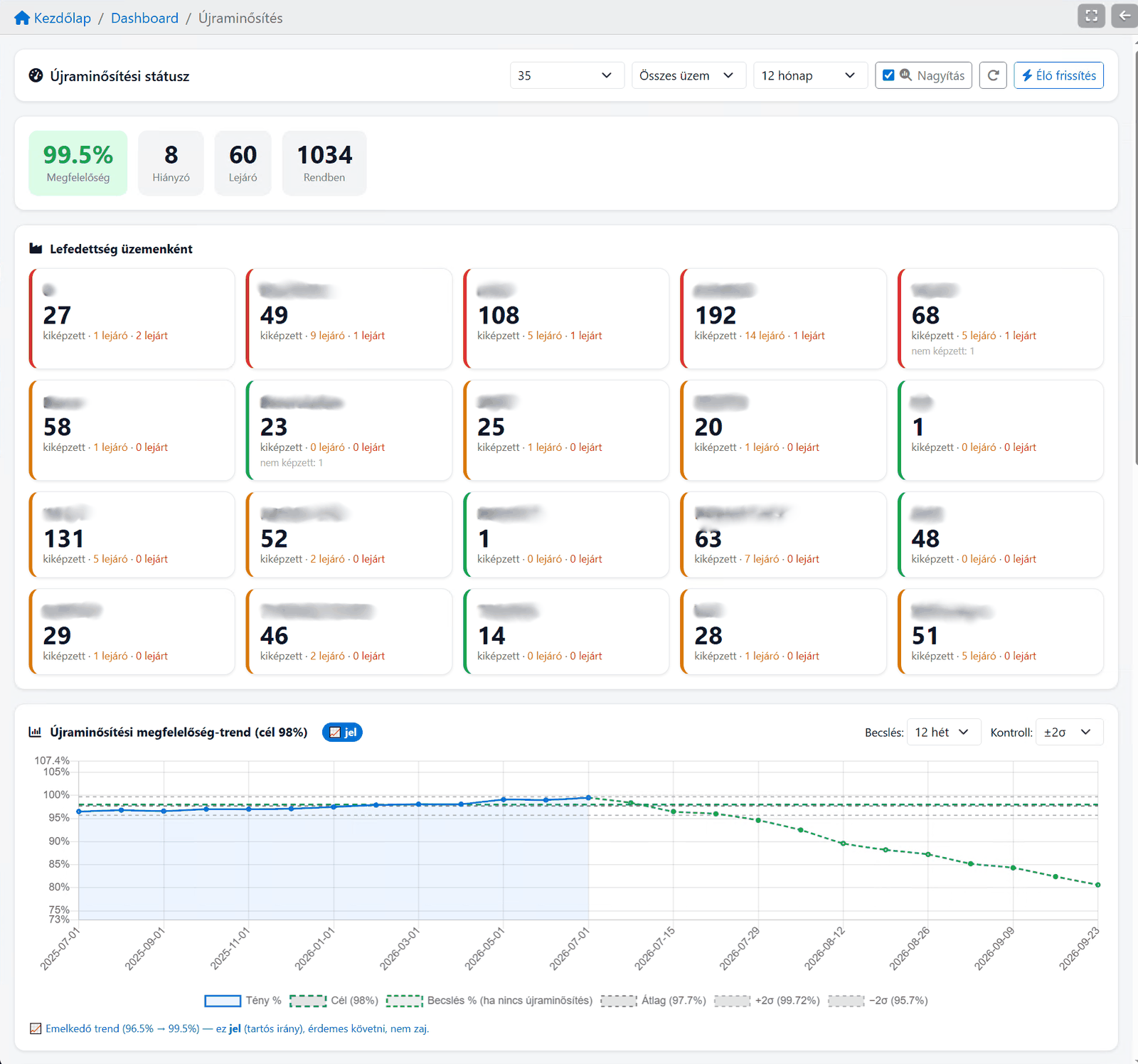
Real screens from live systems, with client and personal data redacted.
See the full report gallery →Two stories — both built on the same system.
The situation differs.The system is the same.
01Why
Every module serves the same goal: it automates, replaces manual admin hours, and so speeds up the payback. HR's time is freed from number-crunching for real work.
HR systems developed and proven in production for a quarter of a century.
SaaS or your own infrastructure — adapted to security and IT requirements.
Transparent, fixed pricing. Growth is not penalized.
02Pricing
03Hosting
The system runs in our cloud environment. Quick to launch, no technical setup required. Updates and maintenance are automatic. HR can focus on daily processes, not IT details.
The system runs in your own environment. Integrates with existing IT processes and internal operations. Functionality is identical to the cloud version. Your organization controls the deployment.
04In practice
We don't list industries — we list situations. Each started somewhere different, and each still works in the same system today.
Not all of our customers started in the same place.
They had one thing in common: they didn't want to look for a new system in a few years.
A standardised start model with a ready-made data and job-role logic, import templates and step-by-step growth.
With suitable starting data the first live process can start within a week.
Meet oneStart →We don't pick a module first — we first understand where your operation stands. The recommendation follows from that.
E-learning & training management
Performance management
Traceable HR document workflow
Work-hour limits & leave, with a manager's view
Onboarding & entry
Management compass
HR School provides comprehensive HR support for One Solution users, including strategic consulting, process development, and training. Whether you need help setting up the system, optimizing your HR processes, or training your managers and HR staff, HR School is there to ensure you get the most out of your investment.
Strategic HR consulting, process development, system implementation support.
Learn moreInterim HR management, tailored HR solutions for SMEs. Flexible support when you need it.
Learn moreManager trainings, appraisal interview techniques, HR administration trainings.
Learn moreOne Learning Zrt.
1021 Budapest, Budakeszi 51/D C.ép. II/5